For some reason, Firefox started to display a blinking cursor, like web pages I have been viewing were editable. Thinking that some errant plugin was causing this behavior, I manically disabled a few I had recently installed. However that didn’t fix the problem.
Good ole Google to the rescue.
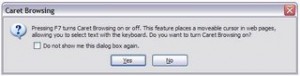
Firefox has a ‘feature’ that lets you select text with more visual feedback. I guess the little one must have been hitting keys and turned this on.
Turning it off is easy! Press F7 to turn off caret browsing.
Alternatively, type “about:config” in the URL area, then filter for “caret“. Change accessibility.browsewithcaret to “false”.




22 comments
Where was the ffox product manager when this was put in?
>Alternatively, type â??about:configâ?? in the >URL area, then filter for â??caretâ??. Change >accessibility.browsewithcaret to â??falseâ??.
This ‘hidden feature’, which fails too many usability principles (I’ll list 3 here):
– Nothing obvious firefox help about this
You’d have to guess it’s an accessibility feature.
– State of this feature is invisible, nothing changes in the status bar
– No menu shortcut to turn it off.
Where was the ffox product manager when this was put in?
>Alternatively, type â??about:configâ?? in the >URL area, then filter for â??caretâ??. Change >accessibility.browsewithcaret to â??falseâ??.
This \’hidden feature\’, which fails too many usability principles (I\’ll list 3 here):
– Nothing obvious firefox help about this
You\’d have to guess it\’s an accessibility feature.
– State of this feature is invisible, nothing changes in the status bar
– No menu shortcut to turn it off.
Thanks, this issue was really bugging me.
Thanks, this issue was really bugging me.
Thank you! I have a 5 yrs old sister that must have done it. It was driving me crazy!
Thank you! I have a 5 yrs old sister that must have done it. It was driving me crazy!
I have tried this fix several times and still does not help. What else could it be?
I have tried this fix several times and still does not help. What else could it be?
Thanks, I must have activated this by accident, you helped me very much here! What a feature…
Thanks, I must have activated this by accident, you helped me very much here! What a feature…
Thanks Dave! This was SOOO annoying as I like to use my arrow keys to scroll down web pages and I couldn’t with the caret browsing on. It was like hitting the END or HOME key and it was frustrating. I guess my little guy must have pushed F7 and turned it on, many thanks!
Thanks Dave! This was SOOO annoying as I like to use my arrow keys to scroll down web pages and I couldn’t with the caret browsing on. It was like hitting the END or HOME key and it was frustrating. I guess my little guy must have pushed F7 and turned it on, many thanks!
I found this when searching for the blinking close button problem solution. I have found a workaround here http://annoyances-resolved.blogspot.com/2009/10/firefox-vista-close-button-blinking.html but not the complete solution. Help!
I found this when searching for the blinking close button problem solution. I have found a workaround here http://annoyances-resolved.blogspot.com/2009/10/firefox-vista-close-button-blinking.html but not the complete solution. Help!
Thx alot! That’s been bugging me for days!
Thx alot! That’s been bugging me for days!
Thank you, my cat wreaked havoc!
Thank you, my cat wreaked havoc!
Thank you!
Thank you!
thanks. i was thinking to buy another notebook because this issue.
Thanks bro!
Comments are closed.