This is my admittedly minor but I hope useful contribution to the TinyOS development community. TinyOS is an Operating System and development framework for Wireless Sensor Networks and other platforms which has a small footprint and is very energy conscious.
The TinyOS source code is available for free online for many operating systems, however it takes a long time to get the environment set up and it is not portable at all. I came across XubunTOS but it did not seem to be in active development anymore, so I endeavored to install TinyOS 2.1 and 2.x from source into a regular Ubuntu image. The most help came from Matt Keally’s Blog. While doing this, I thought it might be useful to many others who wish to develop in the TinyOS framework but might not have the skills necessary to install it. Therefore, I developed this VirtualBox image so that you can install it on any system for which VirtualBox is available and supports USB passthrough for the programming of the motes. I’ve tested on Windows 7, Windows XP and it should work on any other host OS, but I would love to hear your feedback. All funny business aside, I present to the world UbunTOS:
Features
- Ubuntu 9.10 OS (patched through 2/5/2010)
- Complete TinyOS development environment
- TinyOS 2.1 Installed
- TinyOS 2.x CVS Installed (default environment)
- Portable for development in a variety of host environments
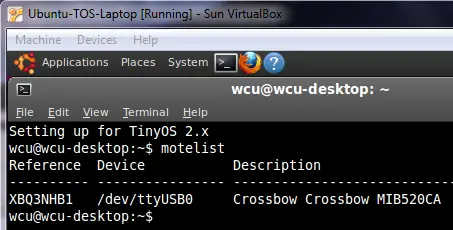
- Patched motelist for MIB520 programming board
Directions
- Unzip the file and import into VirtualBox. I recommend at least 768M RAM
- Boot system
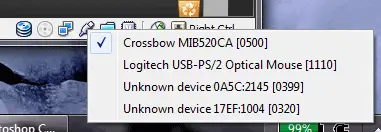
- Enable USB passthrough for the programming board. Check off the USB device in the menu as shown:
- Check ‘motelist’ to see which port it has been assigned to (motelist has been patched to see MIB520 programming board)
- Program away! TinyOS resides in /opt/
Download
MD5 sum: 9a27ba7902337139c2eae0121ec6ca4e
Download UbuntuTOS_Ubuntu-9.10_TinyOS-2.x.zip [2/8/2010]: [ torrent | http ]
If you happen to have spare bandwidth, please send me a note and I will link to the file via http or ftp.
Notes
- The default username is wcu and password is nosecurity
- The hostname is wcu-desktop, in honor of West Chester University which is sponsoring my research into Wireless Sensor Networks.
- To switch between the TinyOS 2.x and 2.1 environment, run the shell script /opt/tinyos-2.1.0/tinyos.sh or /opt/tinyos-2.x/tinyos-2.x.sh. By default the 2.x environment is loaded via ~/.bashrc/.
- To update TinyOS 2.x with latest CVS Code:
cd /opt; cvs -z3 -d:pserver:anonymous@tinyos.cvs.sourceforge.net:/cvsroot/tinyos co -P tinyos-2.x - I’ve testing this using Mica2 and Micaz. Let me know if you have success with other combinations as I just do not have the hardware to test.
- Usually the programming port and the data port are on consecutive ports. In the example above, the programming device is /dev/ttyUSB0 and the data port, for serialforwarder, is /dev/ttyUSB1
Known Bugs?
If you have issues while enabling USB Passthrough, such as an error like:
Version:1.0 StartHTML:0000000105 EndHTML:0000001970 StartFragment:0000000127 EndFragment:0000001952
| Result Code: | E_INVALIDARG (0x80070057) |
| Component: | HostUSBDevice |
| Interface: | IHostUSBDevice {173b4b44-d268-4334-a00d-b6521c9a740a} |
| Callee: | IConsole {6375231a-c17c-464b-92cb-ae9e128d71c3} |
Reboot your host system. I believe this happens while reinstalling the passthrough driver for the USB device for the first time. Rebooting seems to fix this problem, and after the initial setup this problem seems to disappear.
If you have any other problems (or compliments!) please leave a message via the form below.




63 comments
Thanks so much for making this available; I was about to roll my own VM, but was not looking forward to setting up the TinyOS dev environment all over again.
Thanks so much for making this available; I was about to roll my own VM, but was not looking forward to setting up the TinyOS dev environment all over again.
@Jason Gao: Glad you find it useful – let me know if you have any suggestions for enhancements. I was surprised no one else had created a VM for easy development, since TinyOS isn’t exactly easy to set up, especially in a Windows environment. Hope that having a VirtualBox image ready to go will lower the barrier of entry for budding TinyOS developers.
@Jason Gao: Glad you find it useful – let me know if you have any suggestions for enhancements. I was surprised no one else had created a VM for easy development, since TinyOS isn’t exactly easy to set up, especially in a Windows environment. Hope that having a VirtualBox image ready to go will lower the barrier of entry for budding TinyOS developers.
Can it be used in vmware6.5 workstation?
I can’t get it go,First,it complains the file is too large when booting,then i add to vmx file,
but another error occur:
“Bios disk write error,Failed to boot default entries”.
My pc:P4 3.0 Dual, 2G RAM, about 30G unused HDD.
May be i should try the VirtualBox instead.
Can you help me out?
Can it be used in vmware6.5 workstation?
I can’t get it go,First,it complains the file is too large when booting,then i add to vmx file,
but another error occur:
“Bios disk write error,Failed to boot default entries”.
My pc:P4 3.0 Dual, 2G RAM, about 30G unused HDD.
May be i should try the VirtualBox instead.
Can you help me out?
@cgha: This was built in VirtualBox, so I would assume that it requires VirtualBox to boot off of. I haven’t tried it in VMware. Let me know if you have any problems booting in VirtualBox.
@cgha: This was built in VirtualBox, so I would assume that it requires VirtualBox to boot off of. I haven’t tried it in VMware. Let me know if you have any problems booting in VirtualBox.
yeath,i tried in virtualbox,and it can run without error.Cheers!
But when i open eclipse and firefox,the virtualbox crashed saied no more ram available. I arranged 800M RAM to virtualbox,and the cpu is always high than 80%,maybe the virtualbox takes up more resources.So maybe i should try myself with a fresh ubuntu and tinyos without virtual software.Thanks for you excellent work again.
yeath,i tried in virtualbox,and it can run without error.Cheers!
But when i open eclipse and firefox,the virtualbox crashed saied no more ram available. I arranged 800M RAM to virtualbox,and the cpu is always high than 80%,maybe the virtualbox takes up more resources.So maybe i should try myself with a fresh ubuntu and tinyos without virtual software.Thanks for you excellent work again.
Hello,Dave,could you be kindly to offer an iso file that contains ubuntu9.10 and TinyOS2.X?
I installed TinyOS2.1.0 and Ubuntu9.10 in my laptop sucessfully,but when want to update from 2.1.0 to Tinyos-2.x from cvs,i can not compile the examples in TinyOS-2.x anymore.I’ve update the environment for tinyos-2.x.Maybe i missed something.
Hello,Dave,could you be kindly to offer an iso file that contains ubuntu9.10 and TinyOS2.X?
I installed TinyOS2.1.0 and Ubuntu9.10 in my laptop sucessfully,but when want to update from 2.1.0 to Tinyos-2.x from cvs,i can not compile the examples in TinyOS-2.x anymore.I’ve update the environment for tinyos-2.x.Maybe i missed something.
Thanks a lot for this contribution. I was thinking myself on creating an image of the last Ubuntu’s distribution with TinyOS 2.1 installed until I “bounced” on your website! :) I’m new to this whole world of WSN and I found it too hard to do a fresh install.
The only suggestion I can remember right now is for you to create a VM image, so that those who already have VMWare installed (and work often with it) could be able to use your image with minimal effort. Nonetheless, this was a great initiative and I’m sure it will be very useful to me. Thank you once again.
Thanks a lot for this contribution. I was thinking myself on creating an image of the last Ubuntu’s distribution with TinyOS 2.1 installed until I “bounced” on your website! :) I’m new to this whole world of WSN and I found it too hard to do a fresh install.
The only suggestion I can remember right now is for you to create a VM image, so that those who already have VMWare installed (and work often with it) could be able to use your image with minimal effort. Nonetheless, this was a great initiative and I’m sure it will be very useful to me. Thank you once again.
I am new to tinyos. tos-check-env indicates that I should install Java 1.4 or 1.5.
Is this required? What should I actually install? Just the run-time env? J2SE? JDK? I am not familiar with Java installation.
I am new to tinyos. tos-check-env indicates that I should install Java 1.4 or 1.5.
Is this required? What should I actually install? Just the run-time env? J2SE? JDK? I am not familiar with Java installation.
@hardya: If you are using the VirtualBox image, java is already installed. If you are installing it yourself, you will need Java for some of the applications that are built in (for example, SerialForwarder or GraphViz). If you do not need those then you would not need java. To compile any changes in these programs, and to run them, you would need JDK.
@hardya: If you are using the VirtualBox image, java is already installed. If you are installing it yourself, you will need Java for some of the applications that are built in (for example, SerialForwarder or GraphViz). If you do not need those then you would not need java. To compile any changes in these programs, and to run them, you would need JDK.
I am new to tinyos. It was the ‘tos-check-env’ output that concerned me. ‘one of which is required by TOS’: Is this not entirely true then?
”
tos-check-env completed with errors:
–> WARNING: The JAVA version found first by tos-check-env may not be version 1.4 or version 1.5 one of which is required by TOS. Please ensure that the located Java version is 1.4 or 1.5
”
I have since installed the following:
wcu@wcu-desktop:~$ java -version
java version “1.6.0_15”
Java(TM) SE Runtime Environment (build 1.6.0_15-b03)
Java HotSpot(TM) Client VM (build 14.1-b02, mixed mode, sharing)
I am new to tinyos. It was the ‘tos-check-env’ output that concerned me. ‘one of which is required by TOS’: Is this not entirely true then?
”
tos-check-env completed with errors:
–> WARNING: The JAVA version found first by tos-check-env may not be version 1.4 or version 1.5 one of which is required by TOS. Please ensure that the located Java version is 1.4 or 1.5
”
I have since installed the following:
wcu@wcu-desktop:~$ java -version
java version “1.6.0_15”
Java(TM) SE Runtime Environment (build 1.6.0_15-b03)
Java HotSpot(TM) Client VM (build 14.1-b02, mixed mode, sharing)
@hardya: I’m pretty sure you will be fine. Java is a newer version than what the tos-check-env script is looking for. I was able to use it without any problems.
@hardya: I’m pretty sure you will be fine. Java is a newer version than what the tos-check-env script is looking for. I was able to use it without any problems.
Hi Dave, I’ve downloaded the image, and When I was to setup in virtualbox, appears a message ” Failed to boot default entries. Press any key to continue… error: biodisk write error”
I don’t if the image is damaged or corrupted. But if have any solution or another link that I can use to download again, I’ll appreciate a lot you help.
Hi Dave, I’ve downloaded the image, and When I was to setup in virtualbox, appears a message ” Failed to boot default entries. Press any key to continue… error: biodisk write error”
I don’t if the image is damaged or corrupted. But if have any solution or another link that I can use to download again, I’ll appreciate a lot you help.
I’m running this image on VM VirtualBox and having trouble booting it. Am getting the following error:
error: biosdisk write error
Failed to boot default entries
Press any key to continue
Just goes back to the same message after you press any key. Anyone know of a fix to this?
I’m running this image on VM VirtualBox and having trouble booting it. Am getting the following error:
error: biosdisk write error
Failed to boot default entries
Press any key to continue
Just goes back to the same message after you press any key. Anyone know of a fix to this?
So, any answer to Gareth?
So, any answer to Gareth?
I just used an Xubuntos iso in the end.
I just used an Xubuntos iso in the end.
yeah, the same for me.
i’ve lost lot of time on ubuntu, but the tinyos repositories changes all time, and, ubuntu propose always updates that disturb the right functionning of the programming system.
tks
yeah, the same for me.
i’ve lost lot of time on ubuntu, but the tinyos repositories changes all time, and, ubuntu propose always updates that disturb the right functionning of the programming system.
tks
hi, I’m trying to implement the OLSR mechanism of “neighborhood discovering and/with MPRs computing”.
I’ve read, that programers in first times faces some dificulties to write right code, and spent more time in nesc programming.
If any one of you can help me to take way in sensors programming,it would be fany.
and, if code already exists , i think it’s not necessary to reinvente the wheel.
I’ve only 2 months to do this and take on it some changes.
romain_marceau@hotmail.com
thank you all
hi, I’m trying to implement the OLSR mechanism of “neighborhood discovering and/with MPRs computing”.
I’ve read, that programers in first times faces some dificulties to write right code, and spent more time in nesc programming.
If any one of you can help me to take way in sensors programming,it would be fany.
and, if code already exists , i think it’s not necessary to reinvente the wheel.
I’ve only 2 months to do this and take on it some changes.
romain_marceau@hotmail.com
thank you all
hii dave..!
thanks a tonne for this image, it was really very helpful :)
i’m currently working on a project on WSN..
thanks again..
Glad to hear it is working well for you! It is a little tough to get started but you can do so much with the platform.
I have found this to be an issue as well. Clean installs seem to work fine, but if you keep updating Ubuntu eventually the system gets out of whack and you have all kinds of weird errors.
hi Iam using windows7.can anybody tell how to install tinyos
hi Iam using windows7.can anybody tell how to install tinyos
hi Iam using windows7, can you help me to install tinyos
In Windows 7 it should follow the instructions of other Windows based installs. You would need to install Cygwin to get it running directly. I prefer to install VirtualBox and run Ubuntu as the platform, it is much easier to get started. I need to update this image to Ubuntu 10.10, will get to it ‘when I have time.’ :)
i install cygwin then what to do please tell me step by step am new to this
which version of virtualbox i need to install there are so many versions please tell me step by step
Dear dave
Kindly reply.. i installed VirtualBox 3.2.10 for Windows hosts ,after this what to do…waiting for yor reply
Any of the latest versions should work, I tried myself not too long ago and the image imported without any problems.
hi
I installed cygwin in my laptop(windows7 OS).I cant download tinyOS2.x, if i typed this in cygwin cvs -z3 -d:server:anonymous@tinyos.cvs.sourceforge.net:/cvsroot/tinyos co -p tinyos-2.s its shows connection timedout what to do??kindly repl..
hi
i installed ubuntu10.10 in my laptop. i want to install tinyos2.x..i installed virtualbox3.2 also..after this what is the procedure to install tinyos help me…
Hi dave. Im running on virtualbox. However attempting to run it gives,”biosdisk write error, failed to boot default entries.
Any advice?
John,
Does the MD5 match? 9a27ba7902337139c2eae0121ec6ca4e
Thanks,
-Dave
48b3d94fd0c3e4c7ab37a8fb6d6cb8eb was what md5 returned on the vmdk file.
Dear Dave
I installed TinyOS through cygwin in my laptop which having windows7. How
to create .out file in TinyOS
Thanks & Regards
vino
hi
I installed TinyOS through cygwin in my windows7 laptop. how create .out file and how to compile a NesC code in programmers notepad
hi
can you help me how to create a .out file in TinyOS and how to compile nesC code in programmers notepad
hi
can you help me how to create a .out file in TinyOS and how to compile nesC code in programmers notepad
dave for me root password, if i give nosecurity.. its giving authentication failure.. pls help
dave
how to compile nesc code without mote.wat compiler i have to use
Hi, I am trying to download your image, but the torrent is taking forever, and when I try the http option, I get redirected to a Launchrock site. Is the file still available?
Yes, I’m having the same problem. It would be really useful to know if the file is accessible via launchrock and how.
Thanks in advance
Alot of relatively favourable comments despite download links now being broken. Can someone either fix the links or delete this post so it doesn’t turn up in searches anymore – time waster.
Links are fixed and I am seeding the torrent. Thanks for your interest.
Try the link now, it is fine. Thanks!
I tried with VirtualBox. But I am getting error
“Bios disk write error,Failed to boot default entries”.
Please help me to install
Comments are closed.