I’ve been on vacation for the past few days, and prior to this trip I decided I wanted to stay connected wherever I was going – and the new broadband offerings from Cricket Wireless looked to be the perfect solution.
I was looking for something that did not involve signing a contract, but Verizon, Sprint and AT&T’s offerings were pretty expensive. They typically have a “small” data plan, around 250 Megs of transfer for a smaller fee, or an “Unlimited” offering for a fairly expensive rate, around $60 a month for most providers. The Cricket plan I signed up for is an “Unlimited” – read 5GB – plan for $40 a month, with no contract.
Cricket Wireless is relatively new in my area (Philadelphia), having only started providing service in March of 2009. They have been in other markets since 1999. Wireless Broadband has been an offering of their since 2007. Cricket is a subsidiary of Leap Wireless.
The way the “Unlimited” plan works, and why I need to use quotes on Unlimited, is that you get a 5GB quota, and then the speed your connection can be severely restricted to limit your bandwidth consumption. This connection, according to the Acceptable Use Policy you sign when signing up, is meant for “web only” or e-mail traffic; meaning that it is not supposed to be used for streaming video or music (up or down).
The Device
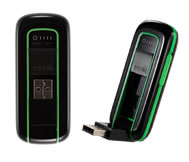 The USB Broadband Modem I purchased is the Cricket A600. It was available on sale for $20 after rebate, which I thought was very reasonable considering you are not purchasing a contract with the modem. Usually providers will give you a roughly $200 price break on the modem if you sign up for a 1 or 2 year contract. This makes their offerings seem cheaper, even though you pay it in the long run.
Costs
Like I have alluded to previous, the big draw for the Cricket network is the cost of the unlimited package, $40 a month with no contract. There is a $25 activation fee. I would assume that this fee applies whether you are starting a new line of service, or if you allow your pre-payment plan to expire; necessitating a re-activation.
How does it work?
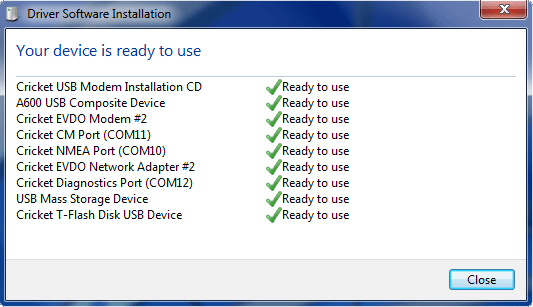
The way the modem works is when you first plug it in, it is recognized as a flash drive and the drivers are installed via Autorun. It currently only supports Windows and Mac OSX; their site specifically states it does not support Linux, although there are instructions on how to get the A600 working in Ubuntu. I am currently using the Windows 7 beta, it did not install correctly automatically – I had to manually install the device drivers using the setup file, and then the modem was installed and found on the next insert. So, even with a few hiccups, the A600 is ready for use on a number of operating systems. You can see the number of devices that are installed when you plug in the modem (Windows 7 screenshot):
As a bonus, the modem also works as a MicroSD card reader. This does not really help you if you do not have a MicroSD card laying around, I happed to have a 2GB one that plugged in and works as advertised. This might be a good thing to have if you are a travelling technician, you could place your thumbdrive programs on this device and have a ready-to-go connection and troubleshooting device.
The Connection
Connectivity is provided by “dialing in” to the Cricket network using their provided application, as seen below:
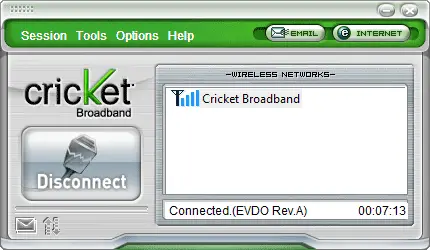
The program has a few functions:
- Connect/Dial In to the network
- Keep track of incoming/outgoing text messages
- Bandwidth manager (did not work on Windows 7)
The program seemed to work as advertised and the big connect/disconnect button is easy enough for the most inexperience internet user to understand.
The Network and Speed Tests
The Cricket Broadband network looks like it piggybacks on the Verizon or Sprint EVDO data networks. So chances are if you do not have these networks available, you would not get Cricket to work either. I had connectivity results that I had expected, in areas that are highly populated I had excellent connectivity (4/4 bars) and at other locations “in the sticks” I had only 1 or 0 bars. I was able to get connection in most places, even if the signal was very poor.
The data network always read “EVDO Rev A” which has a maximum “burst” rate of 2.45 Mbit/s to 3.1 Mbit/s. I tested in many locations; my speed with a “full” connection averages about ~ 500kbps download and ~ 200kbps upload. With a 0 or 1 bar connection I was still seeing a 500kbps download but a paltry 70kbps upload. Don’t expect this connection to replace your home broadband or wifi connection, it was pretty much impossible to watch a YouTube video, the same with any sort of multimedia content. You may be able to stream a highly compressed music stream. SSH, FTP, SFTP all seemed to work – one of my concerns being a system administrator was that these ports would be blocked, but I seemed to have an unfettered connection. I did try Logmein, on my “weak” signal it did not seem to want to connect but worked pretty well with a full signal.
Another thing I seemed to encounter with a poor signal was loss of connection. Since you are basically dialing in (my wife exclaimed, “I haven’t dialed in for 10 years!”) if you lose the signal for a few moments you get disconnected. It is not horrible, because you can reconnect, but the Cricket dialup program did not give me a notice or sound an alarm, I just started getting “Page not accessible” errors in my browser. If you are connecting in an area that has a poor signal, expect to be frustrated with your Cricket connection. It is not necessarily their problem, but it is worth mentioning.
Your connection locally is issued a private network in the 10.100.x.x range. Ping times varied from 80ms to 120ms. Do not expect to be able to do online FPS gaming from this connection. For your perusal is a traceroute from the Cricket connection in Ocean City, NJ to www.yahoo.com.
  1    61 ms    59 ms    65 ms  172.30.218.x
  2    60 ms    65 ms    66 ms  172.28.49.x
  3    64 ms    66 ms    57 ms  172.16.8.x
  4    70 ms    73 ms    64 ms  ge-8-16.car1.Philadelphia1.Level3.net [4.78.152.249]
  5   172 ms    68 ms    70 ms  ae-7-7.ebr2.Washington1.Level3.net [4.69.133.162]
  6    73 ms    65 ms    72 ms  ae-62-62.csw1.Washington1.Level3.net [4.69.134.146]
  7    83 ms    70 ms    82 ms  ae-61-61.ebr1.Washington1.Level3.net [4.69.134.129]
  8   102 ms    89 ms    91 ms  ae-2.ebr3.Atlanta2.Level3.net [4.69.132.85]
  9   119 ms   106 ms   107 ms  ae-7.ebr3.Dallas1.Level3.net [4.69.134.21]
 10   110 ms   138 ms   108 ms  ae-41-90.car1.Dallas1.Level3.net [4.69.145.195]
 11   104 ms   102 ms    98 ms  YAHOO-INC.car1.Dallas1.Level3.net [4.79.180.2]
 12   102 ms   149 ms   104 ms  ae2-p130.msr2.mud.yahoo.com [216.115.104.93]
 13   102 ms    99 ms   100 ms  te-9-1.bas-c2.mud.yahoo.com [68.142.193.11]
 14   110 ms   103 ms    98 ms  b1.www.vip.mud.yahoo.com [209.191.93.53]
Conclusion
When all is said and done, you have to appreciate that having this little device and signing up for the Cricket Broadband service, for $40 a month and no contract, gets you an internet connection wherever you go, at least wherever you have signal. Although I suspect that a direct Verizon, Sprint or AT&T broadband connection would give you faster access, I do not think it would expand your coverage and you would pay a lot more for it. Cricket gets you a decent connection for a fair price, and I think that is worth it. If you are expecting a wired connection speed then look elsewhere, but as long as your demands are reasonable, you should be happy with Cricket Wireless Broadband.
I would recommend this modem to anyone who is looking for a web connection that is extremely portable and inexpensive. As long as your bandwidth demands are not exceedingly high, you should be happy with this modem.
Update 2009/7/20:
If anyone has clarifications on whether Cricket Wireless owns their own equipment (from tower to net) please let me know. I would just assume they ‘resell’ Verizon, Sprint or other “1st tier” provider wireless towers instead of building their own, which would be very expensive.
Also, I discovered you do not need to use the applet they provide to log into the Cricket wireless network. On Windows 7 at least, you can dial in directly with Windows’ Network Connection Center.




104 comments
Thanks for this review. It definitely sounds interesting.
I took a peek at the links you provided, and couldn’t quickly find out the following. Here’s hoping you know the answer (I’m not asking you to do research for me). ;-)
Is it trivial to turn the service off and on at will? I often go months without using this kind of “emergency broadband”. Sometimes, I can predict that I will need it on a trip.
Usually, I find myself somewhere where they want to charge a ridiculous amount for broadband, and I switch to my “insurance” wireless broadband plan.
It would be cool to be able to pop in the modem, get a page that says “You aren’t currently subscribed, re-enable?”, and pay the $40 for the next month’s service, starting that minute.
Then, when the month is over, just “disconnect” the service again, until the next time you need it…
Thanks again.
Thanks for this review. It definitely sounds interesting.
I took a peek at the links you provided, and couldn’t quickly find out the following. Here’s hoping you know the answer (I’m not asking you to do research for me). ;-)
Is it trivial to turn the service off and on at will? I often go months without using this kind of “emergency broadband”. Sometimes, I can predict that I will need it on a trip.
Usually, I find myself somewhere where they want to charge a ridiculous amount for broadband, and I switch to my “insurance” wireless broadband plan.
It would be cool to be able to pop in the modem, get a page that says “You aren’t currently subscribed, re-enable?”, and pay the $40 for the next month’s service, starting that minute.
Then, when the month is over, just “disconnect” the service again, until the next time you need it…
Thanks again.
@Hadar Pedhazur: I will edit my review, thanks for reminding me! There is a $25 activation fee to start/resume the service. Will add a section on “costs”.
@Hadar Pedhazur: I will edit my review, thanks for reminding me! There is a $25 activation fee to start/resume the service. Will add a section on “costs”.
Question? Do you know if I can use ssh for Iphone with Criket broadband.
Question? Do you know if I can use ssh for Iphone with Criket broadband.
Thanks Dave. Much appreciated!
Thanks Dave. Much appreciated!
Cricket does not “piggyback” on either Verizon or Sprint. They have their own towers and their own network.
Cricket does not “piggyback” on either Verizon or Sprint. They have their own towers and their own network.
@GeeVeeen: Sorry, your question does not make sense. SSH for iPhone would run over AT&T’s 3G network. It would not involve the Cricket Wireless network at all. That being said, I did not detect any ‘port blocking’ so any SSH program should work with Cricket Wireless Broadband.
@GeeVeeen: Sorry, your question does not make sense. SSH for iPhone would run over AT&T’s 3G network. It would not involve the Cricket Wireless network at all. That being said, I did not detect any ‘port blocking’ so any SSH program should work with Cricket Wireless Broadband.
It never worked for me and I had a horrible experience. If anyone has solutions let me know, otherwise, I have a battle ahead to get my activation fee back.
It never worked for me and I had a horrible experience. If anyone has solutions let me know, otherwise, I have a battle ahead to get my activation fee back.
@CluelessinColorado: Can you give more details about what your problem was? Did you have a signal where you were located? Did you contact Cricket support, and if so, how was their response?
@CluelessinColorado: Can you give more details about what your problem was? Did you have a signal where you were located? Did you contact Cricket support, and if so, how was their response?
I only wish i had the speeds you say you have i am lucky if it is going at 20kps. It runs at the speed of dial up most the time even though i have 4 bars. Once i get my rebate i won’t be using it. Way to slow for 40 a month.
I only wish i had the speeds you say you have i am lucky if it is going at 20kps. It runs at the speed of dial up most the time even though i have 4 bars. Once i get my rebate i won’t be using it. Way to slow for 40 a month.
Cricket Broadband 600-700 dl 300-400up South Jersey area Vineland etc. Ok signal no disconnects. Over a few WinXP Netbooks. Acer One 8.9, HP mini 1030nr, Asus EEE 701 Surf, and a Dell Mini 10 All have worked and installed like a champ.. Im still trying to get it working on Windows 7 on the Dell Mini. I tryied the manual driver pointing and no luck. Any info on this? Should I download the software from Cricket or use the software that on the Modem? OR do I need the dual Cable to install it?
Cricket Broadband 600-700 dl 300-400up South Jersey area Vineland etc. Ok signal no disconnects. Over a few WinXP Netbooks. Acer One 8.9, HP mini 1030nr, Asus EEE 701 Surf, and a Dell Mini 10 All have worked and installed like a champ.. Im still trying to get it working on Windows 7 on the Dell Mini. I tryied the manual driver pointing and no luck. Any info on this? Should I download the software from Cricket or use the software that on the Modem? OR do I need the dual Cable to install it?
got it workin in win7..
you have to select the other setup file exe that is on the modem itself. its 2megs or so, then it finds everything.
got it workin in win7..
you have to select the other setup file exe that is on the modem itself. its 2megs or so, then it finds everything.
Cricket does own and operate their own network. They do not roam on Sprint or Verizon at all. They do have EVDO in approximately 34 plus Washington DC. If you want an always on connection, enable “NDIS” through the options menu — not sure if NDIS is supported in Windows 7 or not.
Cricket does own and operate their own network. They do not roam on Sprint or Verizon at all. They do have EVDO in approximately 34 plus Washington DC. If you want an always on connection, enable “NDIS” through the options menu — not sure if NDIS is supported in Windows 7 or not.
The Cricket Broadband service is great because I can go anywhere with it and install it on as many computers as I want to without them saying anything.
It is pretty slow but I found a few ways to increase the modem speed like installing the Opera web browser which has “Opera Turbo for slow Internet connections.
The Cricket Broadband service is great because I can go anywhere with it and install it on as many computers as I want to without them saying anything.
It is pretty slow but I found a few ways to increase the modem speed like installing the Opera web browser which has “Opera Turbo for slow Internet connections.
Can you give more detail on what you had to do to get this working under Windows 7? I have Win7 and I can’t get the A600 to work.
Can you give more detail on what you had to do to get this working under Windows 7? I have Win7 and I can’t get the A600 to work.
@GeeVeeen: Sorry, your question does not make sense”
Your answer to him doesnt make sense. SSHD isnt filtered incoming or outgoing if thats the question. Im sure it is. sshd does sit on port 22 of the incoming box. Att would be the outgoing connection…
@GeeVeeen: Sorry, your question does not make sense”
Your answer to him doesnt make sense. SSHD isnt filtered incoming or outgoing if thats the question. Im sure it is. sshd does sit on port 22 of the incoming box. Att would be the outgoing connection…
Nice review, Very helpful.
Nice review, Very helpful.
@Jason Harris: Had to browse the files on the install drive. Instead of using autorun, I double clicked on the “setup” executable – I do not have the modem here but I will check on it when I get home.
@Jason Harris: Had to browse the files on the install drive. Instead of using autorun, I double clicked on the “setup” executable – I do not have the modem here but I will check on it when I get home.
Nice job Dave!!!
When I installed the modem on laptop everything installed fairly well. The modem lit up beautifuly and the software started up nicely. Though I had no problems with the install, I had 2 – 3 bars on my modem , and EVDO rev A showed at the bottem of my window, I couldnt connect to the internet beca use the was no “Cricket Broadband” so i could not pick a network.
This was not the case with my desktop so I was able to connect to the internet eventhough I had zero bars. This made me suspect that my problem was my Atheros AR5007eg Wireless Network Adapter.
I disabled It, uninstalled it, and still nothing. After lots of trial and error I finally got it to work. On the Cricket Broadband Screen I went to options and opened “Preferences”. i went to WWAN and checked the “enable NDIS” box.
MY Cricket Boadband screen changed and i noticed that i was able to go online. I hope this helps anyone who might be having the same problem.
I am running Windows Vista Home Edition on an ACER Aspire 3100 Laptop.
Nice job Dave!!!
When I installed the modem on laptop everything installed fairly well. The modem lit up beautifuly and the software started up nicely. Though I had no problems with the install, I had 2 – 3 bars on my modem , and EVDO rev A showed at the bottem of my window, I couldnt connect to the internet beca use the was no “Cricket Broadband” so i could not pick a network.
This was not the case with my desktop so I was able to connect to the internet eventhough I had zero bars. This made me suspect that my problem was my Atheros AR5007eg Wireless Network Adapter.
I disabled It, uninstalled it, and still nothing. After lots of trial and error I finally got it to work. On the Cricket Broadband Screen I went to options and opened “Preferences”. i went to WWAN and checked the “enable NDIS” box.
MY Cricket Boadband screen changed and i noticed that i was able to go online. I hope this helps anyone who might be having the same problem.
I am running Windows Vista Home Edition on an ACER Aspire 3100 Laptop.
I just purchased a cricket Broadband and I just can’t seem to get it to connect through windows xp. I checked everything their is to check, but i just can’t seem to find the problem. What should I do?
I just purchased a cricket Broadband and I just can’t seem to get it to connect through windows xp. I checked everything their is to check, but i just can’t seem to find the problem. What should I do?
I been using Cricket broadband sine they launched it, was happily and satisfy customer until i found my internet speed was breaking down.. i scan my system no virus detect, i use my friend wi fi to make sure and it work great, so i call cricket customer service, and they said i exceed my limit which is 5gb, i still can use my internet but only with poor speed, and Cricket tech support guy said My net will be back to normal in couple days.. i waited 2 week nothing happened, so well id to pay my oct bill, i called them back and ask if after pay my bill it will be alright and tech support engineer had no answer for me.. he said all i can do is wait till tomorrow and see if its working fine or not, so i asked..what if it doesn’t work fine then? and he replied back *then its upto you* i was like wow great service, so here i am 2 days passed by but still same poor speed, now i don’t have any other choice but to switch my broadband service. so all i would say…if you want good service then don’t think about cricket.
I been using Cricket broadband sine they launched it, was happily and satisfy customer until i found my internet speed was breaking down.. i scan my system no virus detect, i use my friend wi fi to make sure and it work great, so i call cricket customer service, and they said i exceed my limit which is 5gb, i still can use my internet but only with poor speed, and Cricket tech support guy said My net will be back to normal in couple days.. i waited 2 week nothing happened, so well id to pay my oct bill, i called them back and ask if after pay my bill it will be alright and tech support engineer had no answer for me.. he said all i can do is wait till tomorrow and see if its working fine or not, so i asked..what if it doesn’t work fine then? and he replied back *then its upto you* i was like wow great service, so here i am 2 days passed by but still same poor speed, now i don’t have any other choice but to switch my broadband service. so all i would say…if you want good service then don’t think about cricket.
The Cricket Broadband service is great because I can go anywhere with it and install it on as many computers as I want to without them saying anything.
It is pretty slow but I found a few ways to increase the modem speed like installing the Opera web browser which has “Opera Turbo for slow Internet connections.
The Cricket Broadband service is great because I can go anywhere with it and install it on as many computers as I want to without them saying anything.
It is pretty slow but I found a few ways to increase the modem speed like installing the Opera web browser which has “Opera Turbo for slow Internet connections.
DO YOU KNOW IF THE MODEM OF CRICKET WIRELESS GOES FASTER IF YOU INSTALL A MICRO SD CARD IN THE MODEM???
DO YOU KNOW IF THE MODEM OF CRICKET WIRELESS GOES FASTER IF YOU INSTALL A MICRO SD CARD IN THE MODEM???
I want to set up a vpn server to view my desktop on my android my touch phone how can I do this with the cricket air modem? Please e-mail to let me know Thank you in advance for your time on this matter.
I am using a cricket air modem on my laptop that is running the vpn server. When I wave the mouse over the V icon in the bottom of the screen the ip comes up as 10.102.1.89 however when I goto what is my ip address .com It says 69.171.171.67 how can I use my android tmobile my touch to view my laptop over the internet my email is badgereye@gmail.com Thank you for your help in advance. Aaron
I want to set up a vpn server to view my desktop on my android my touch phone how can I do this with the cricket air modem? Please e-mail to let me know Thank you in advance for your time on this matter.
I am using a cricket air modem on my laptop that is running the vpn server. When I wave the mouse over the V icon in the bottom of the screen the ip comes up as 10.102.1.89 however when I goto what is my ip address .com It says 69.171.171.67 how can I use my android tmobile my touch to view my laptop over the internet my email is badgereye@gmail.com Thank you for your help in advance. Aaron
@Aaron W: You are going to have to get your VPN set up on your android phone, that will be the tricky part. This doesn’t have anything to do with the cricket air modem; since the laptop doesn’t care how it is connected to the internet. If your VPN works, then you would use your VPN IP and not the public or private internet IP, all your traffic from Cricket is tunneled through their servers. If the VPN connection is valid, this is the only way to make a connection to your laptop.
@Aaron W: You are going to have to get your VPN set up on your android phone, that will be the tricky part. This doesn’t have anything to do with the cricket air modem; since the laptop doesn’t care how it is connected to the internet. If your VPN works, then you would use your VPN IP and not the public or private internet IP, all your traffic from Cricket is tunneled through their servers. If the VPN connection is valid, this is the only way to make a connection to your laptop.
can anyone help: my toshiba/xp/a600 set up was infected with security virus. it’s gone, but now a600 won’t reinstall. says another installation under way. several other things won’t work as well: can’t open internet options, delete explorer, or have hijack remove r0 and r1 files. Yikes. do I need new modem; xp reinstall? thanks
can anyone help: my toshiba/xp/a600 set up was infected with security virus. it’s gone, but now a600 won’t reinstall. says another installation under way. several other things won’t work as well: can’t open internet options, delete explorer, or have hijack remove r0 and r1 files. Yikes. do I need new modem; xp reinstall? thanks
Here are the instructions on how to make the A600 work with Windows 7!
http://social.answers.microsoft.com/Forums/en-SG/w7network/thread/68993875-e829-403b-8f65-431bf2eeba89
Here are the instructions on how to make the A600 work with Windows 7!
http://social.answers.microsoft.com/Forums/en-SG/w7network/thread/68993875-e829-403b-8f65-431bf2eeba89
BUT , what no one is saying is that they have blocked PPTP traffic, so NO vpning into your office or home networks!
This just stinks!
BUT , what no one is saying is that they have blocked PPTP traffic, so NO vpning into your office or home networks!
This just stinks!
I do use cricket in south jersey, I think their network may be one of the best implemented network around and their covarege is good. I also think the cap the download at around 700Kb’s for proper bandwidth allocation to their users and to avoid quick compsumtion of vlient’s 5GB allowance. For $40, it is really a competition killer.
I do use cricket in south jersey, I think their network may be one of the best implemented network around and their covarege is good. I also think the cap the download at around 700Kb’s for proper bandwidth allocation to their users and to avoid quick compsumtion of vlient’s 5GB allowance. For $40, it is really a competition killer.
So I have an update for all of you.
I am currently employed with Cricket Wireless and as of
10/01/09 Cricket launched a NEW MODEM the UM185 at least
here in Portland OR they did which DOES support Windows 7 and it’s over passed the expectations of speed we had thought it would offer.
Now The reason why you In Philadelphia had a lack of speed was because you were first off using the Crickets A600 modem which was not updated nor did it come supported for Windows 7. If you currently have the A600 you can go to a full service store and have the tech support replace the current software with the one compatible with Windows 7.
Purchase Price is no different then before and it can not be compared to what any other company can offer for month to month service for the price we do. CLEAR Wireless attempts to compete with Cricket but from the business prespective of things they first off have a minimum of a 1yr contract..$35 activation fee and the lack of reception is way noticeable so bottom line is that there is no comparing the two companies specially when CLEAR attempts to market them Selves as 4g and Wimax operated???
I mean first off 4g is just a way to target people not well informed of the present technology.
In summary. Try us out….you have nothing to loose. But much savings to gain. We currently are proud to say we Can link both of our Modems the a600 and um185 to either an Xbox360 or PS3.
so as of 01/08/10 Cricket is leading the UNLIMITED WIRELESS BROADBAND INDUSTRY in those States and Cities Supported.
Jesus Morga
Cricket Wireless
Sales Manager.
So I have an update for all of you.
I am currently employed with Cricket Wireless and as of
10/01/09 Cricket launched a NEW MODEM the UM185 at least
here in Portland OR they did which DOES support Windows 7 and it’s over passed the expectations of speed we had thought it would offer.
Now The reason why you In Philadelphia had a lack of speed was because you were first off using the Crickets A600 modem which was not updated nor did it come supported for Windows 7. If you currently have the A600 you can go to a full service store and have the tech support replace the current software with the one compatible with Windows 7.
Purchase Price is no different then before and it can not be compared to what any other company can offer for month to month service for the price we do. CLEAR Wireless attempts to compete with Cricket but from the business prespective of things they first off have a minimum of a 1yr contract..$35 activation fee and the lack of reception is way noticeable so bottom line is that there is no comparing the two companies specially when CLEAR attempts to market them Selves as 4g and Wimax operated???
I mean first off 4g is just a way to target people not well informed of the present technology.
In summary. Try us out….you have nothing to loose. But much savings to gain. We currently are proud to say we Can link both of our Modems the a600 and um185 to either an Xbox360 or PS3.
so as of 01/08/10 Cricket is leading the UNLIMITED WIRELESS BROADBAND INDUSTRY in those States and Cities Supported.
Jesus Morga
Cricket Wireless
Sales Manager.
@Jason Harris:
Morning Bro,
Take your A600 to a full service location and have them replace the current software to our new one that does support Win7
@Jason Harris:
Morning Bro,
Take your A600 to a full service location and have them replace the current software to our new one that does support Win7
it sucks i didnt maen to download a driver how do i fix it plus my pc is a 2002.
it sucks i didnt maen to download a driver how do i fix it plus my pc is a 2002.
jesus do u know how to fix no crickt store will flash it
jesus do u know how to fix no crickt store will flash it
@Jesus Morga – what about the issue of going over the 5g then speed slowing down. (See Jas comment) I can understand that for a set period but not for the life of your service. I have only gone over the 5g once because I was using it for work so it was unintentional so I would not want to be punished for that forever. It was not with Cricket. I was going to switch to Cricket so I didn’t have to have a contract and I would also have the lower price but would like to know the policy on this issue first.
@Jesus Morga – what about the issue of going over the 5g then speed slowing down. (See Jas comment) I can understand that for a set period but not for the life of your service. I have only gone over the 5g once because I was using it for work so it was unintentional so I would not want to be punished for that forever. It was not with Cricket. I was going to switch to Cricket so I didn’t have to have a contract and I would also have the lower price but would like to know the policy on this issue first.
I had Verizon mobile broadband – recently switched over to Cricket. However I can’t logon to my company’s VPN on Cricket. I used to be able to do that on Verizon. I saw one posting about PPTP being blocked.
Do you know if Cricket is doing anything about it?
I had Verizon mobile broadband – recently switched over to Cricket. However I can’t logon to my company’s VPN on Cricket. I used to be able to do that on Verizon. I saw one posting about PPTP being blocked.
Do you know if Cricket is doing anything about it?
I’ll try that and see if it makes viewing you-tube any better
I’ll try that and see if it makes viewing you-tube any better
@Dave: actully with ur dial up on the cricket a 600 if u go into options enable vpn and disable the dial up connection this will elminate most of your disconnect problems as fas as cricket tech support their pretty much useless I had 3 bars of signal couldnt get the modem to work they said it was impossibel n e way with the vpn ur connection should average around 700kbps still kinda slow but You can watch youtube videos with little to no buffering wait time
@Dave: actully with ur dial up on the cricket a 600 if u go into options enable vpn and disable the dial up connection this will elminate most of your disconnect problems as fas as cricket tech support their pretty much useless I had 3 bars of signal couldnt get the modem to work they said it was impossibel n e way with the vpn ur connection should average around 700kbps still kinda slow but You can watch youtube videos with little to no buffering wait time
HI
DOES MAGICJACK USB PHONE CONNECTION WORK WITH CRICKET WIRELESS BROADBAND (A600). THANKS FOR YOUR HELP
HI
DOES MAGICJACK USB PHONE CONNECTION WORK WITH CRICKET WIRELESS BROADBAND (A600). THANKS FOR YOUR HELP
@Jesus Morga:
Mr. Morga is by far the most knowledgeable cellular representative I have ever dealt with. Cricket is lucky to have such a smart and helpful person working for their company. Throughout the years I have had many different wireless carriers, including AT&T, Cingular, and T-moble. Because of the outstanding customer service that Mr. Morga has provided for Cricket wireless, I am pleased to say that my experiences with this company have been superior to the others. He puts a good name and face on this company and I will recommend it to everyone I know.
@Jesus Morga:
Mr. Morga is by far the most knowledgeable cellular representative I have ever dealt with. Cricket is lucky to have such a smart and helpful person working for their company. Throughout the years I have had many different wireless carriers, including AT&T, Cingular, and T-moble. Because of the outstanding customer service that Mr. Morga has provided for Cricket wireless, I am pleased to say that my experiences with this company have been superior to the others. He puts a good name and face on this company and I will recommend it to everyone I know.
My issue is as follows. Make my payment 3/3/2010. Cricket took 48-72 hours to post it (should have been done in 24 hours). My service was disconnected and I had to pay again for my service to be restored. I decided not to continue with this company. Long story short, I asked for a refund on 3/26/2010. My service was discontinued 4/2/2010, but my money (the double payment) still has not been refunded. I was told the request was done, but the company does not know the date it was supposedly done. Now they want me to fax their Payment Refund Department and state the problem from the beginning. This is REALLY lousy. Maybe it would be better if I called the BBB and Channel 13 Call For Action department (Las Vegas, NV). What do you think?
My issue is as follows. Make my payment 3/3/2010. Cricket took 48-72 hours to post it (should have been done in 24 hours). My service was disconnected and I had to pay again for my service to be restored. I decided not to continue with this company. Long story short, I asked for a refund on 3/26/2010. My service was discontinued 4/2/2010, but my money (the double payment) still has not been refunded. I was told the request was done, but the company does not know the date it was supposedly done. Now they want me to fax their Payment Refund Department and state the problem from the beginning. This is REALLY lousy. Maybe it would be better if I called the BBB and Channel 13 Call For Action department (Las Vegas, NV). What do you think?
@Debra Adams: Debra all i can do is apologize for the issues you experienced. I know for a fact however that we did have major system delays in early March due to horrible weather conditions, but also am aware that we did reverse reconnection fees to those customers who brought it to our attention before attempting a 2nd payment on the automated system . At this point avoid the cst service line and go directly to one of the corporate offices to get this situated. Good luck!
@Debra Adams: Debra all i can do is apologize for the issues you experienced. I know for a fact however that we did have major system delays in early March due to horrible weather conditions, but also am aware that we did reverse reconnection fees to those customers who brought it to our attention before attempting a 2nd payment on the automated system . At this point avoid the cst service line and go directly to one of the corporate offices to get this situated. Good luck!
@Jesus Morga: I will try your suggestion. But my payment was made over the phone ($2.00 fee) after a cst svs agent said they could not find my payment even though I gave they the confirmation number for the payment. I think they should give back my $2.00 also!!
@Jesus Morga: I will try your suggestion. But my payment was made over the phone ($2.00 fee) after a cst svs agent said they could not find my payment even though I gave they the confirmation number for the payment. I think they should give back my $2.00 also!!
Even with 3/4 bars I still get auto-disconnect far too often. There’s nothing like moving to a window or sub-text within a web site/page only to get “cannot display, check connection”. I’m just a casual at home user so I don’t lose business, but I would think the ‘dormant’ time frame prompting auto-disconnect could be more forgiving. I also notice that downloads are snail pace; the fastest I’ve seen, when displayed in a window, was 71.5 kb/s. and the slowest at 13.8 kb/s.
Even with 3/4 bars I still get auto-disconnect far too often. There’s nothing like moving to a window or sub-text within a web site/page only to get “cannot display, check connection”. I’m just a casual at home user so I don’t lose business, but I would think the ‘dormant’ time frame prompting auto-disconnect could be more forgiving. I also notice that downloads are snail pace; the fastest I’ve seen, when displayed in a window, was 71.5 kb/s. and the slowest at 13.8 kb/s.
@Jesus Morga: I finally got a refund. I called the 2 corp. offices in Las Vegas and no one answered the phone. I decided to call the corp.office in CA, told them my prob and that no one answered the phone at 2 of their corp. offices. They put someone in charge of solving my prob. Glad I changed services anyway because cricket service was slow from day one. Told everyone I know not to even use cricket phones, company service is terrible.
@Jesus Morga: I finally got a refund. I called the 2 corp. offices in Las Vegas and no one answered the phone. I decided to call the corp.office in CA, told them my prob and that no one answered the phone at 2 of their corp. offices. They put someone in charge of solving my prob. Glad I changed services anyway because cricket service was slow from day one. Told everyone I know not to even use cricket phones, company service is terrible.
Recently bought the A600 Modem but got screwed when it came time for the rebate. I was sent a letter stating my form was too late ??? Yet it states the service period has to be at least 45days but also states must be returned within 30 days of purchase???
Recently bought the A600 Modem but got screwed when it came time for the rebate. I was sent a letter stating my form was too late ??? Yet it states the service period has to be at least 45days but also states must be returned within 30 days of purchase???
Cricket/Leap does own their own network including towers, cellular equipment and leased backhaul. I live in Pittsburgh PA where recently the download speed jumped without notice from about 1.5m bits / S to 2.5m bits / S and upload from around 350k bits / S to 720k bits / S. Not always but frequently. Additionally the busy time congestion (5pm – 9pm edt) seems to be almost a negligible issue as of today (July 10, 2010). For the last 2 years this has been my primary internet connection to work and has proven itself to be a great cost to performance value. I highly recommend Cricket Broadband.
Cricket/Leap does own their own network including towers, cellular equipment and leased backhaul. I live in Pittsburgh PA where recently the download speed jumped without notice from about 1.5m bits / S to 2.5m bits / S and upload from around 350k bits / S to 720k bits / S. Not always but frequently. Additionally the busy time congestion (5pm – 9pm edt) seems to be almost a negligible issue as of today (July 10, 2010). For the last 2 years this has been my primary internet connection to work and has proven itself to be a great cost to performance value. I highly recommend Cricket Broadband.
Some cricket modems will not work in the front USB drive of a pc like
my pc that has windows xp. You have to use the USB ports in the back
of the pc to get it to work properly. Also my cnnection was fast at first now
slow to really slow lol
Thank you for your input. This is probably because of the power that is supplied to the USB port. Your front ones may not be able to support the modem, or there is an internal issue with the connection.
I also had a horrible experience with cricket and did not find them to uphold their their representative statements regarding service and terms of contract. I was unable to stream video, it took over a week to recieve the modem (during which time service was considered “activated”), they did not follow what the representative stated about billing dates and expected me to pay for the current month (note they charge in advance) in order to cancel my service. I am currently tryinga 3G service and so far it is much better. I”m going tomake a point of using the 3G service for everything that usually comes up in my school./work before I commit either way. The 3 G service is the same price of cricket so I don’t feel that cricket is giving any special deal.
Cricket Broadband is a waste of your money. It is very inconsistent and 90% of the time too slow to use. The concept of customer service is non existant unless you can borrow someone else’s reliable broadband to file your cricket issue online.
I have been with Cricket A600 since 05/22/10 and being near one of the towers the service has been great never dropped, first time connect page loads are great OS updates and small downloads are fast and on top of that I run Linux, just have the store activate the device and your set.
Thanks, I live in Pittsburgh as well. I am considering a purchase of this cricket plan and modem and from your experience looks like it works well in this area!
magicjack needs a lot more bandwidth than cricket modems can provide. my magicjack works like magic with my home cable but the cable downloads at 30megs. my cricket only downloads at a maximum of 400kbs even with an outdoor external antenna on the roof and the tower is only one block away from me. there is no way to carry on a phone conversation with a situation like that but i do get a very poor dial tone but even it quickly dies out on me. i am going to switch to sprint 4g which soon will be 5g according to the reps in my area. don’t waste money on cricket you will be sorry but magicjack is a real winner for me. it works better than a real phone service honestly…….
in reply to tony CEF i forgot something. i also have 2 cricket cell phones and had to replace the original 2 they gave me to start off with 8 months ago and trust me the phones are just as bad as the modems are. it is very seldom that i can even make a phone call without getting cut off every 5 min’s and i am within a block of the cell tower too. it’s not a location problem either because the phones do the same thing all over town. please do not support cricket you will be sorry like i am. go with sprint or verizon and you will be happy but make sure you get 4g service not 3g…..
I live in Philly and had Cricket first. They were HORRIBLE, there is NO customer service for broadband and I was treated like sh*t. I’m very happy with Clear, I do not have a contract, the other fees were identical to Cricket, and I pay waaay less than $35/month :)
I purchased the $40 rate plan not knowing about the data caps. My speed was fast for about 2 weeks. then we hit the cap. Web surfing is possible. But not all that enjoyable. Weve since blasted past the 2.5gig cap and now at 6gig for the 30 day period. I mostly use it for online gaming. I play a certain MMO that uses a decent amount of bandwidth. The interesting thing is that i can play my MMO even while capped perfectly fine. Very lilttle delay at all. I can even run 2 instances of the game on 2 pcs and still play well. Web surfing still sucks but for 40 a month i dont really care. My living situation with my “gf” is horrible so i dont want a contract with a high speed provider in case i leave the apartment. All in all not bad.
I want to get the icon cricket dial applet for my broadband connection
Comments are closed.